In today’s world, Snapchat is a fun app for sharing photos, videos, and chats with friends. But like any social media, it can have risks. People worry about privacy, scams, or someone spying on accounts. Many search for ways to “monitor” Snapchat, but it’s important to do this legally and safely.
Some websites claim they can hack or spy on Snapchat accounts. One example is tools like Snaptroid. These are usually scams. They promise to show private chats, “My Eyes Only” content, or deleted snaps. But they don’t work. Instead, they try to steal your information, make you fill out surveys, or download bad software.
This article shows you safe and legal ways to protect your Snapchat. We focus on official Snapchat tools, smart habits, and how to spot scams. No illegal spying or fake hacking tools here. The goal is to keep your account safe, protect your privacy, and stay secure online.
1. Legitimate Ways to Monitor Snapchat Without Spying

You don’t need third-party apps to watch over Snapchat use. Snapchat has built-in features for parents and users. These respect privacy while giving helpful info.
Snapchat Family Center is the best official tool for parents. It helps parents see who their teens (ages 13-18) talk to on Snapchat. It does not read messages or see content. It shows friends, recent chats (who, not what), time spent, and location sharing if allowed.
Key features of Family Center:
- See your teen’s friends list.
- View who they message most (names only, no chat content).
- Check how much time they spend on Snapchat.
- See their privacy settings.
- Request location sharing on Snap Map.
- Set content controls to limit sensitive stuff in Stories and Spotlight.
- Report suspicious friends.
Family Center builds trust. It starts conversations about safety, not secret spying.
How to Set Up Snapchat Family Center (step-by-step):
- Download the Snapchat app if you don’t have it.
- Create or log in to your own Snapchat account. (Parents should be over 25 years old for full features.)
- Add your teen as a friend: Search their username and send a friend request. They must accept.
- Open Family Center in the app:
- Go to your Profile (top left).
- Tap the gear icon for Settings.
- Scroll to “App & Privacy” or search “Family Center.”
- Or search “family” or “safety” in the app search bar.
- Invite your teen: Select their name and send an invitation.
- Your teen gets a chat message from you. They must accept it (remind them in person if needed).
- Once linked, you can see their activity and adjust settings.
Your teen must agree. This keeps things open and fair. Family Center also lets parents restrict content, limit My AI (Snapchat’s AI chatbot), and more.
Snapchat Parental Controls are part of privacy settings. Parents can guide teens to use them.
For everyone (not just parents):
- Go to Settings > Privacy Controls.
- Choose who can contact you: Everyone, Friends, or Friends of Friends.
- Set who can view your Stories: Friends or Custom.
- Control who can see you in Quick Add or search.
These settings help limit strangers.
Educating teens about privacy is key. Talk openly with your kids or teens.
Tips for teens to protect accounts:
- Use a strong password (mix letters, numbers, symbols).
- Turn on two-factor authentication (2FA) in Settings > Two-Factor Authentication. This sends a code to your phone when logging in from a new device.
- Only add real friends.
- Don’t share personal info like address or school.
- Think before posting – snaps can be saved by others.
Open talks work better than secret monitoring. Ask: “What do you like about Snapchat? Any weird messages?”
2. How to Spot Snapchat Scams Like Snaptroid Instantly
Scams are common on Snapchat. Sites like Snaptroid promise “free” access to private snaps. They are fake.
Red flags of scam websites:
- Promises to hack “My Eyes Only,” see deleted snaps, or read private chats.
- Says “100% free,” “no login needed,” or “instant results.”
- Uses urgency: “Act now before it expires!”
- Shows fake loading bars or previews that never finish.
- Asks for your Snapchat username first, then more steps like surveys, app downloads, or personal info.
How these scams work:
- You enter a username on the site.
- It shows a fake “preview” or loading screen.
- Then it redirects: Complete a survey, download an app, or enter email/phone.
- Nothing happens – no access. But scammers get your data or install malware.
- Some ask for money or gift cards.
Snaptroid and similar tools are scams. They don’t hack Snapchat. Snapchat’s security is strong – no public tool can bypass it legally.
How to protect yourself:
- Never trust sites promising private Snapchat data with just a username.
- Stick to the official Snapchat app from app stores.
- Avoid third-party “tools,” “viewers,” or “hackers.”
- If a friend sends a link to such a site, don’t click.
3. What to Do If a Website Claims to Hack Snapchat
If you find a site claiming to hack Snapchat, stay calm. Follow these steps:
- Don’t interact: Close the page. Don’t enter info or download anything.
- Check if it’s fake:
- No real contact info or company details.
- Strange domain (not snapchat.com).
- Lots of pop-ups or redirects.
- Use Google Safe Browsing: Search “site:example.com” or check transparencyreport.google.com/safe-browsing.
- Avoid suspicious links in messages or emails.
- Report the site:
- To Google Safe Browsing if it’s bad.
- To Snapchat support if it targets users.
- Check your Snapchat account:
- Log in and see recent logins or devices.
- Change password right away if worried.
- Enable 2FA if not on.
- Scan for malware: If you downloaded something, use free tools like Malwarebytes or Avast.
- Watch your money: Check bank or card statements for odd charges.
Act fast to stay safe.
4. Protecting Your Snapchat Privacy and Security: Best Practices
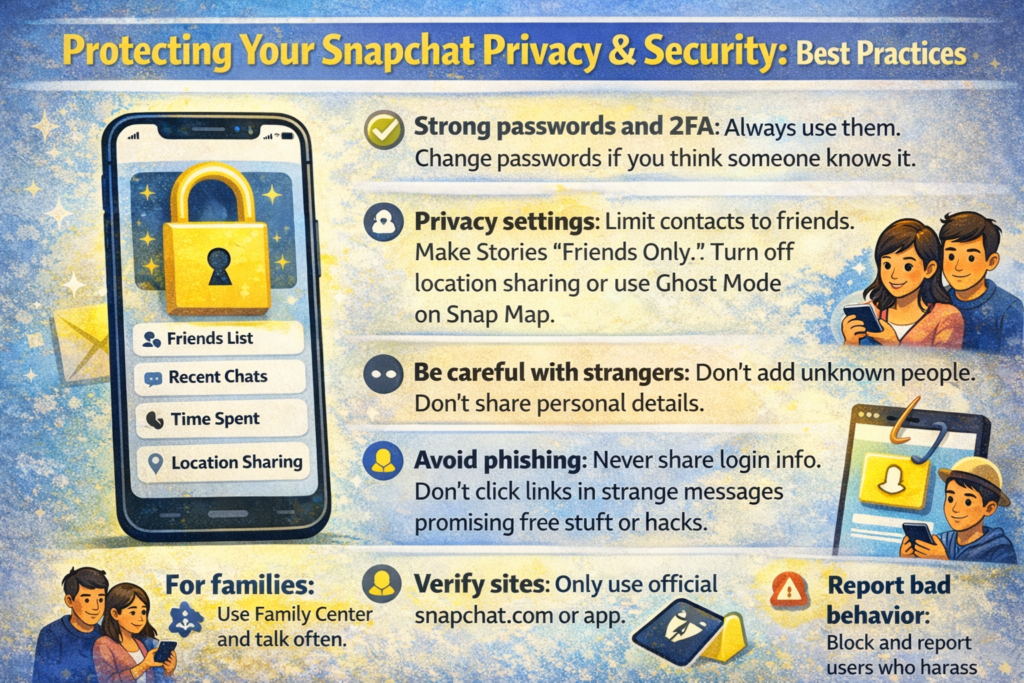
Here are simple tips for everyone:
- Strong passwords and 2FA: Always use them. Change passwords if you think someone knows it.
- Privacy settings: Limit contacts to friends. Make Stories “Friends Only.” Turn off location sharing or use Ghost Mode on Snap Map.
- Be careful with strangers: Don’t add unknown people. Don’t share personal details.
- Avoid phishing: Never share login info. Don’t click links in strange messages promising free stuff or hacks.
- Verify sites: Only use official snapchat.com or app.
- Update app: Keep Snapchat updated for new security fixes.
- Report bad behavior: Block and report users who harass or scam.
For families: Use Family Center and talk often.
Conclusion: Stay Safe on Snapchat by Monitoring Legally and Avoiding Scams
Protecting Snapchat is easy with legal tools. Use Snapchat Family Center for parents to monitor safely. It shows friends and activity without invading privacy. Combine it with strong privacy settings and open talks.
Scams like Snaptroid are traps. They steal data or harm devices. Avoid any site promising hacks or private access.
The best way? Use Snapchat’s official features. Talk to family about safe use. Stay informed, use strong security, and enjoy Snapchat without fear.
Disclaimer: This article is for informational purposes only. We do not support or encourage using third-party apps or websites that claim to hack or spy on Snapchat. Always use official Snapchat features to stay safe. Be careful of scams that may steal your personal information. We are not responsible for any problems caused by using untrusted tools. Stay safe online!
Explore More
- Snaptroid and Its Impact on Different Audiences
- Who Is Behind Snaptroid? Ownership, Anonymity & Red Flags
- What Does The Eyes Mean On Snapchat Story
